

Sleep Study Academy · Healthcare education · 2024 · Vue 3 · AdonisJS · PostgreSQL · Konva · ExcelJS
Sleep-study scoring, graded online.
An online training and assessment platform for sleep technologists. Trainees score real sleep studies page by page and are graded at once against an expert key. Educators author the studies, review the work and export performance.
- Industry
- Healthcare education · Sleep medicine
- Scope
- Product build, from backend and admin tools to the trainee scoring experience, reporting and deployment
- Delivered
- Trainee web app · Admin console · Backend service · Excel performance reports · Paid sign-up · Containerised deployment
01 / Challenge
Why did learning to score a sleep study depend on an expert's free time?
Reading a sleep study is a skill learned by doing. Technologists look at a recording page by page and decide the sleep stage and any events on each one. The client taught this skill, but practice and feedback depended on experts checking each trainee's work by hand.
Trainees
Had few ways to practise on real recordings and get a clear, fair score.
Educators
Spent time marking the same answers again and again, with no easy way to leave visual feedback on a tracing.
Course administrators
Managed learners, access periods and payments across separate tools.
Programme leads
Could not easily see how a learner, or a whole cohort, performed across studies.
Consistent scoring between technologists matters for patient care. Training for it needed to be scalable, fair and measurable.
Let trainees score real sleep studies online, get graded instantly, and give educators the tools to author content, review work and track performance.
02 / Solution
What does a scoring course look like when it marks itself?
We built a web platform with two sides: a scoring workspace for trainees and a console for educators. Both run on one shared backend that holds the content, the answer keys and the grades.
What it covers
Study library
Public catalogue of categories and studies, with search, so visitors can see what's on offer before signing up.
Scoring workspace
Page-by-page scoring with a progress grid, zoom, pan, full-screen view and drawing tools on the recording.
Instant grading
Every answer is checked against the expert key on submission, with a score and a pass or fail.
Review and feedback
Trainees see their answer next to the correct one. Educators can draw their own notes on top of a trainee's markings.
Content authoring
Educators create studies, add pages with images and rich-text notes, set answer keys and publish.
Learner management
Add learners one by one or import a list from a spreadsheet, set access expiry, and disable or re-enable accounts.
Paid self-registration
New learners can sign up and pay online to get access.
Performance exports
Excel reports for one learner across all studies, or one study across chosen learners, down to each page's answer.
Onboarding videos
A "How it works" page walks new users through the platform.
03 / Highlights
What makes the grading fair?
Old results stay true when content changes
Educators often need to fix or improve a study after people have taken it. The platform keeps every published study as a version. Editing creates a new draft and leaves the old version untouched. Past attempts are always graded and reported against exactly what the trainee saw. Try unlocking the study, changing a key and publishing: the past attempt doesn't move.
v3PUBLISHEDLOCKED
Page 12 key · stage N2
v4—
Page 12 key · stage N2
Past attempts
New attempts graded on v3. This one stays on v3.
Marking up the recording, not just ticking boxes
Trainees can draw boxes and lines with labels right on the recording to show what they saw. Educators add their own markings in a different colour on the same image. Markings stay in the right place on any screen size. Feedback becomes visual and specific, like a tutor pointing at the page. Try marking the trace with each pen, then narrow the screen.
1 trainee · 0 educator markings. Click the trace to add one.
Fair, instant, consistent grading
Each page is scored on four separate parts: sleep stage, arousal, breathing event and leg movements. Each part counts on its own, so partial understanding earns partial credit. Every trainee is marked against the same expert key, the same way, the moment they submit. Try submitting, then change an answer and submit again.
Score 0.00 / 1.00
Reports that answer real questions
Administrators can export one learner's history across every study, or one study's results across a chosen group of learners. Each spreadsheet includes a summary sheet, a page-by-page detail sheet and a sheet describing what the export contains. Scoring codes are turned into readable labels, so the file makes sense outside the platform. Try exporting, then flip through the sheets.
Stored as codes: 2 · A1 · H · L0
| Page | Stage | Arousal | Respi | Limb |
|---|---|---|---|---|
| 12 | N2 | Arousal | Hypopnea | None |
| 13 | N3 | None | None | 1 movement |
| 14 | Wake | Arousal | None | None |
Learner access handled in one place
Spreadsheet import, access expiry dates, account disabling and paid sign-up all live in the same console. Running a cohort doesn't need separate tools. Try importing the sheet, then disabling a learner.
Active 2
- 0411A. Menonuntil 2026.12.31
- 0412R. Pillaiuntil 2026.11.30
04 / Product
What does a trainee score in?
01 / Library
A library of real studies
Studies inside a category, each with its level and a short clinical brief, searchable before sign-up.
FIG. 04.1 / Library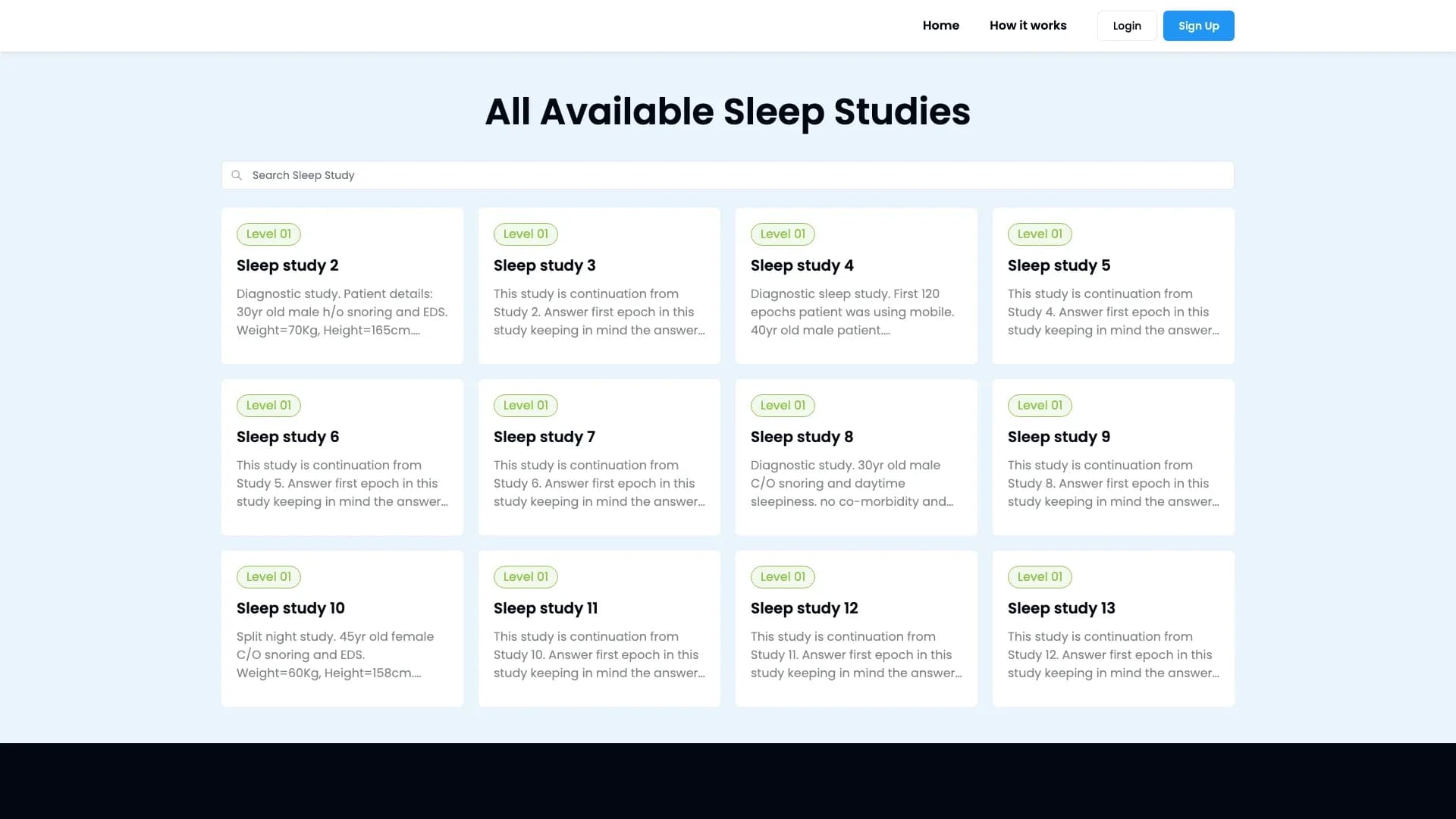
02 / Scoring
One recording, page by page
The page grid on the left tracks progress through 200 epochs; the recording on the right can be zoomed, panned and marked up.
FIG. 04.2 / Scoring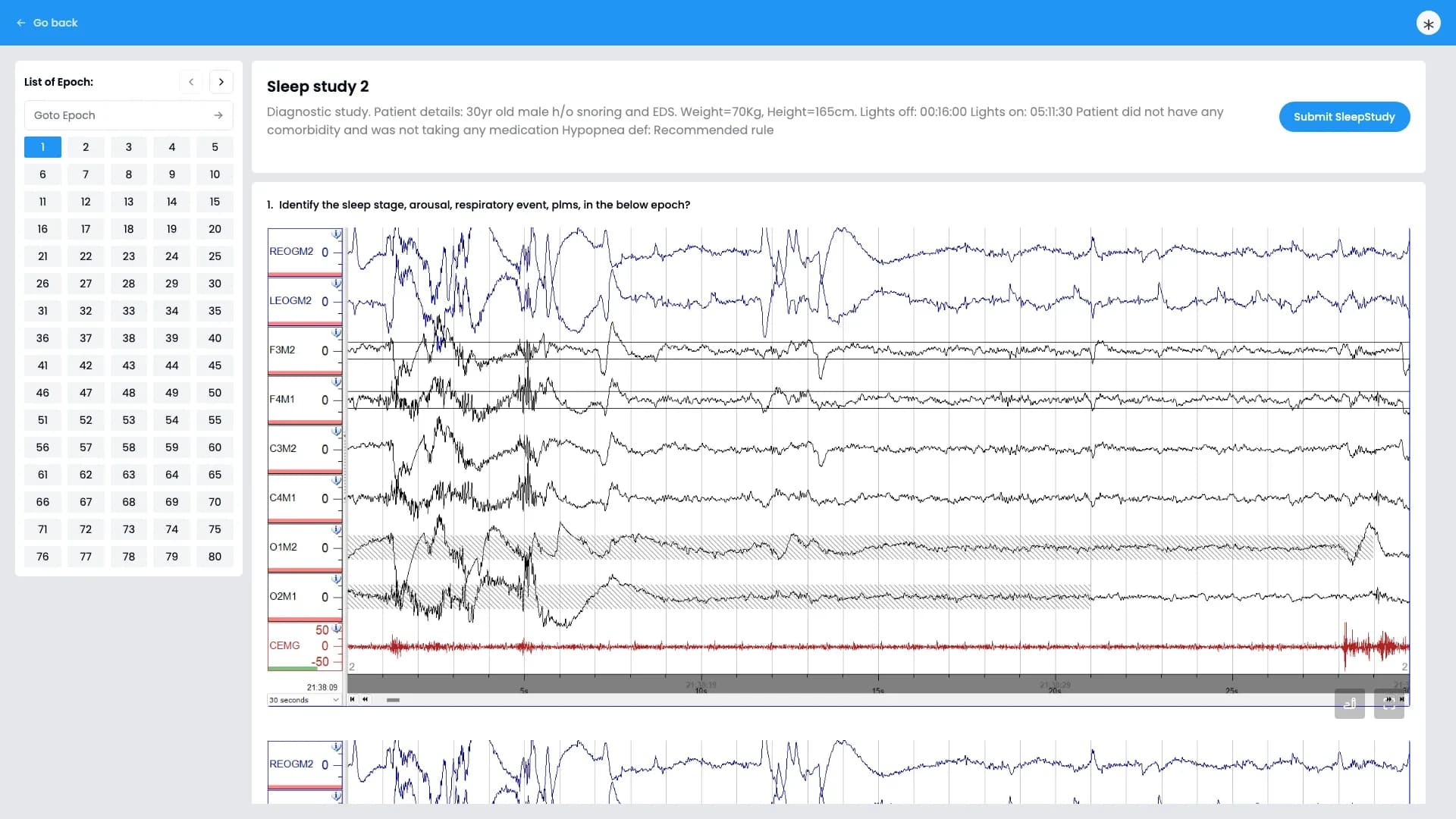
03 / Answers
Four answers per page
Sleep stage, arousal, breathing event and limb movement, each chosen from a short set of options.
FIG. 04.3 / Answers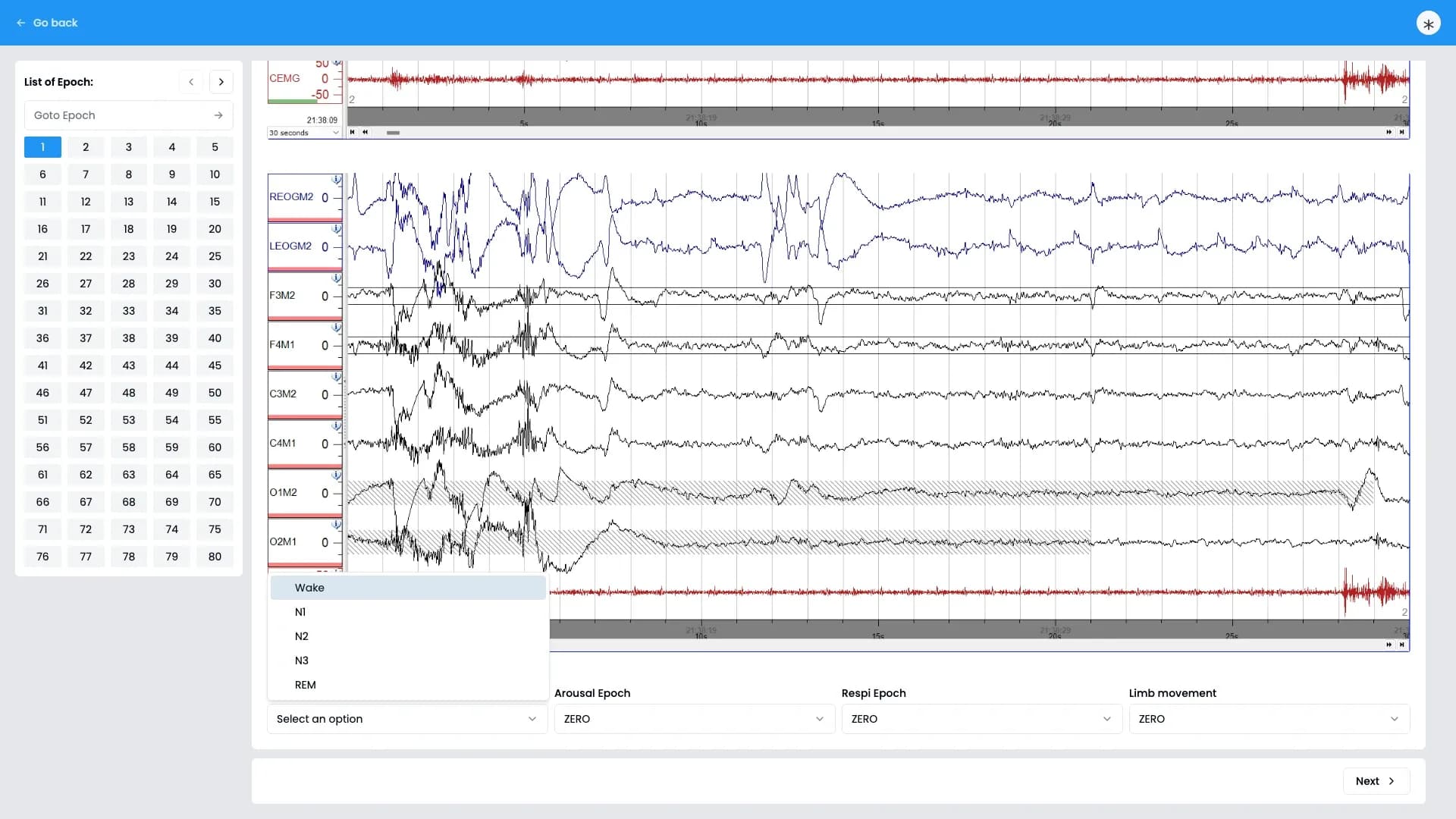
04 / Graded
Your answer, then the key
After submission every page shows the trainee's answers above the correct ones, so a mistake is clear at a glance.
FIG. 04.4 / Graded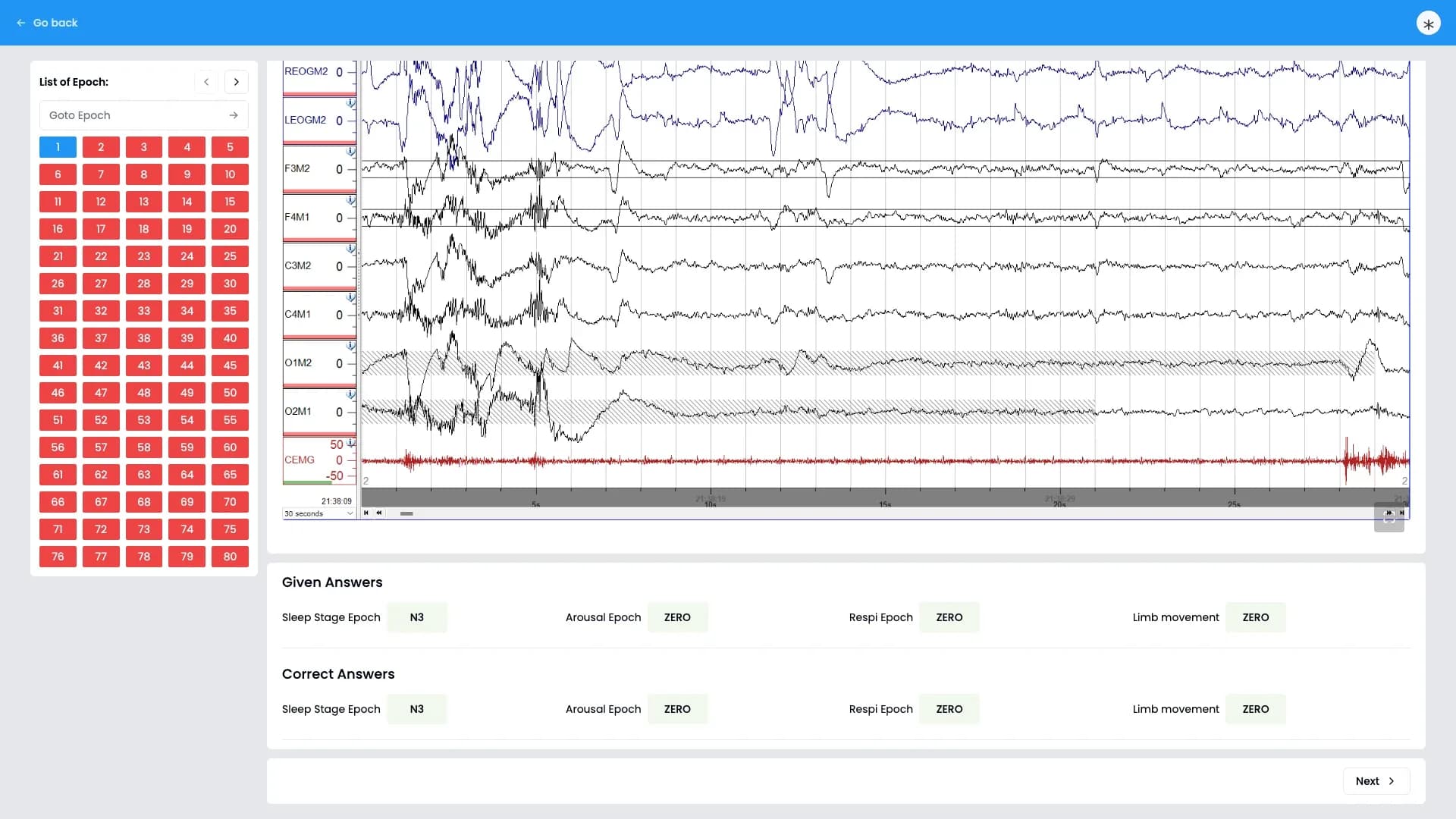
05 / Studies
Every study, versioned
The admin list: each study with its published version, attempts, total marks and pass mark.
FIG. 04.5 / Studies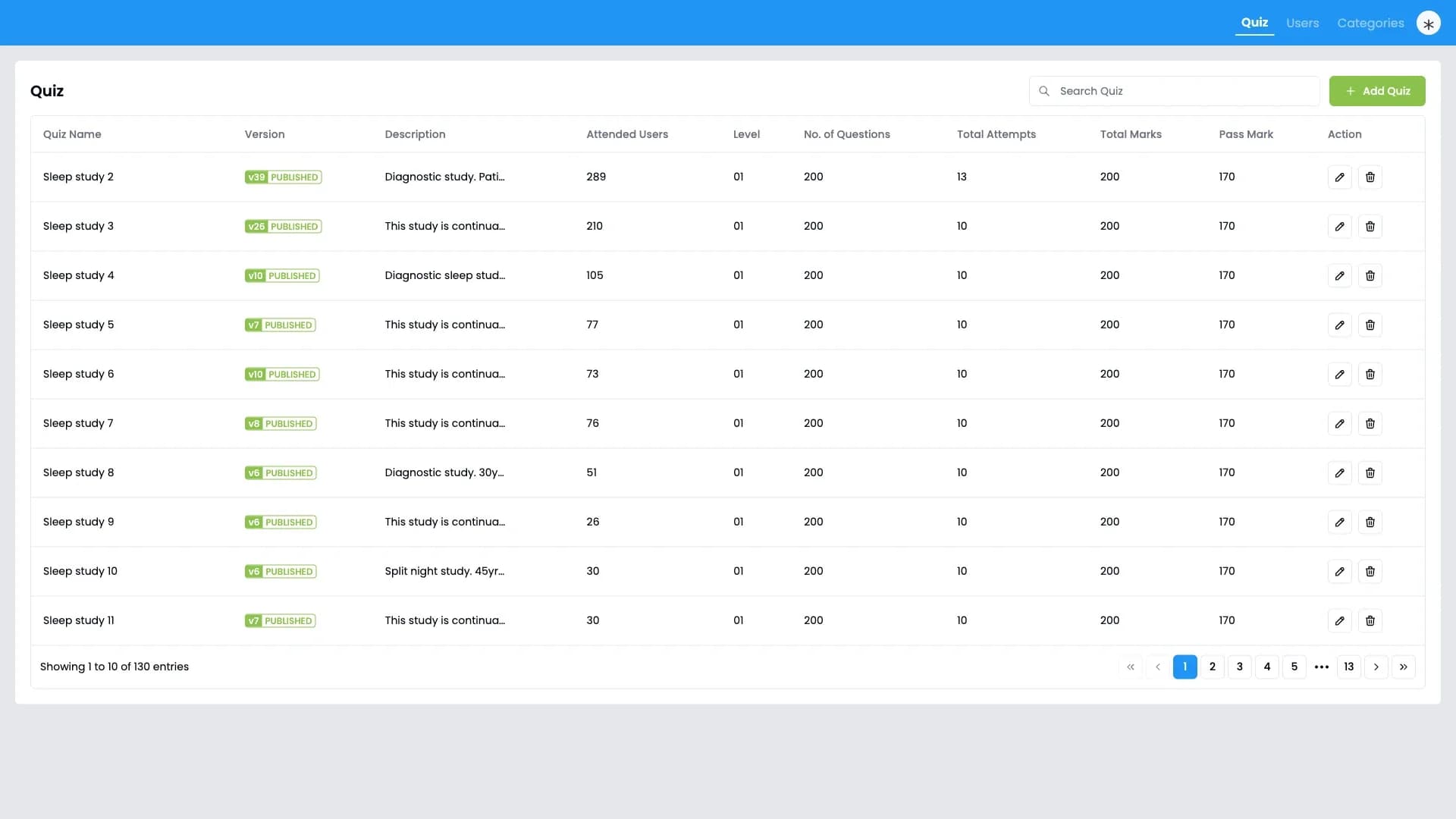
06 / Editor
Published pages stay locked
A study's details beside its questions. Published pages are locked until an educator unlocks them into a new draft; performance exports start here.
FIG. 04.6 / Editor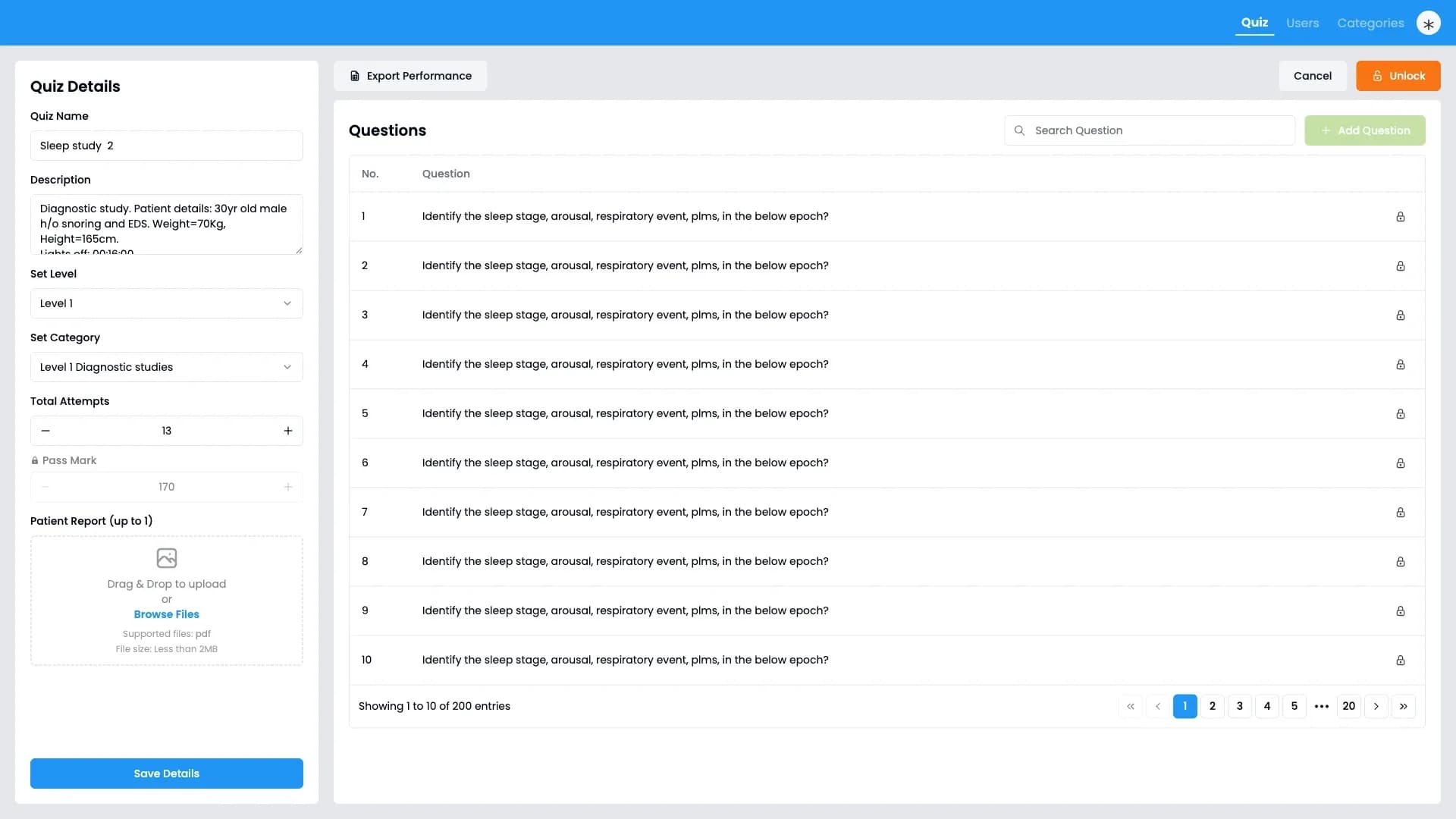
A library of real studies
Studies inside a category, each with its level and a short clinical brief, searchable before sign-up.
FIG. 04.1 / Library
05 / Architecture
How do the scores stay out of the browser's reach?
- 01One source of truthAll content, answers and grades live in the backend. The web app only displays them, so scores can't be changed from the browser.
- 02Versioned contentPublished studies are never edited in place, which protects the history of every attempt.
- 03Role-based accessTrainees and administrators see different areas, and every request is checked on the server.
- 04Simple to runTwo containers and a database, with error monitoring built in, keep hosting and support straightforward.
06 / Stack
What is it built with?
- Web app
- Vue 3, TypeScript, Vite
- UI
- Tailwind CSS, shadcn-vue / Radix Vue components
- Data fetching & state
- TanStack Query, Pinia
- Drawing on recordings
- Konva (editing), SVG (read-only views)
- Rich-text notes
- Tiptap
- Forms & validation
- vee-validate, Zod, VineJS
- Backend
- AdonisJS 6 (Node.js, TypeScript)
- Database
- PostgreSQL with Lucid ORM
- Reports
- ExcelJS (.xlsx)
- Payments
- Razorpay
- SMTP with MJML templates
- Monitoring
- Sentry
- Hosting
- Docker, nginx, GitLab CI image builds
07 / Delivered
What did the client receive?
- 01Trainee web appPublic study library, sign-up, scoring workspace, results and report pages.
- 02Admin consoleStudy and category authoring, learner management with spreadsheet import, attempt review and feedback, performance exports.
- 03Backend serviceAccounts and roles, versioned content, automatic grading, file uploads, password reset email and payments.
- 04Excel reportingTwo performance reports with summary, page-level detail and an info sheet.
- 05Data migration toolingScripts to move existing data into the new platform.
- 06DeploymentDocker images for both apps, an nginx setup and a compose file for the server, plus tag-based image builds.
- 07Handover documentationA technical guide covering the system, data model, setup and known follow-ups, plus design specs for the reporting features.
08 / Impact
What changed for trainees and educators?
Practice at scale
Trainees can score real studies whenever they like, without waiting for an expert to be free.
Less repetitive marking
Grading happens automatically, so educators can spend their time on feedback, not checking answers.
Consistent standards
Every learner is measured against the same expert key, supporting the goal of agreement between scorers.
Clearer oversight
Programme leads can pull a learner's or a cohort's results into a spreadsheet in a few clicks.
A library that can grow
Content is grouped by category and versioned safely, so new studies can be added without disturbing past results.
09 / What's next
Where does the platform go from here?
- 01Automated testingExtend the first test suites to cover grading and the scoring workspace.
- 02Autosave while scoringSave answers as trainees work, so a closed tab never loses progress.
- 03Cloud file storageMove recording images to cloud storage so the platform can scale beyond a single server.
- 04Security and privacy hardeningTighten cross-site access rules and reduce personal data sent to error monitoring.
- 05Shared drawing logicCombine the two annotation views into one so markings look identical everywhere.